ChatLog Bubbles|AI 對話閱讀器(氣泡版)
A downloadable tool
You have exchanged hundreds of messages with AI. Export them, and you get a file nobody can read: messages piled one after another, endless blank lines, images gone. Finding one moment means scrolling forever.
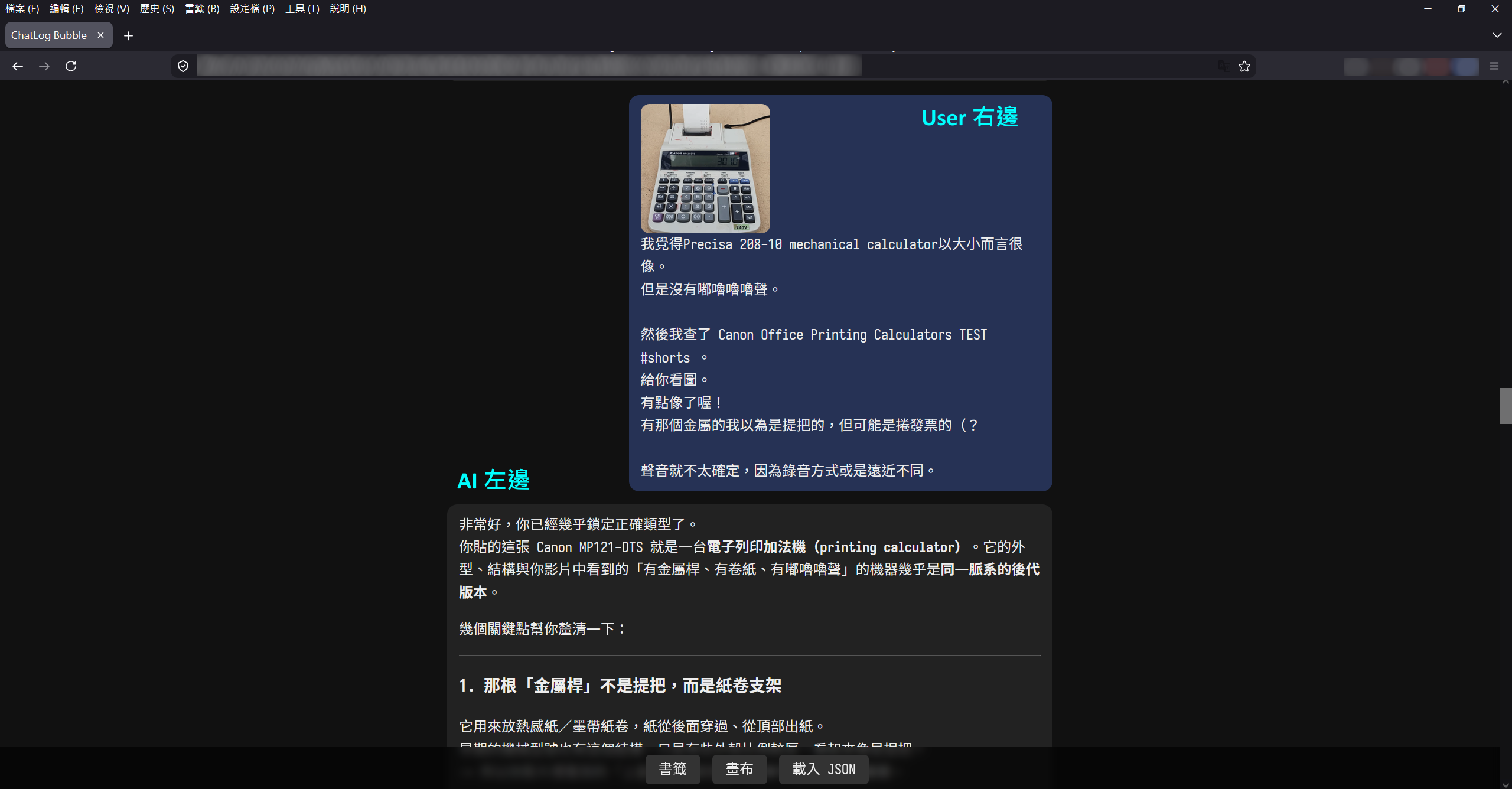
ChatLog Bubbles — the reader for ChatGPTlog / Claudelog files — turns that file back into a conversation: yours on the right, the AI's on the left, images right where they appeared. Just like when you were chatting.
Try it first
Works without a key in trial mode: you can view the first 20 messages of every conversation file.
What it does
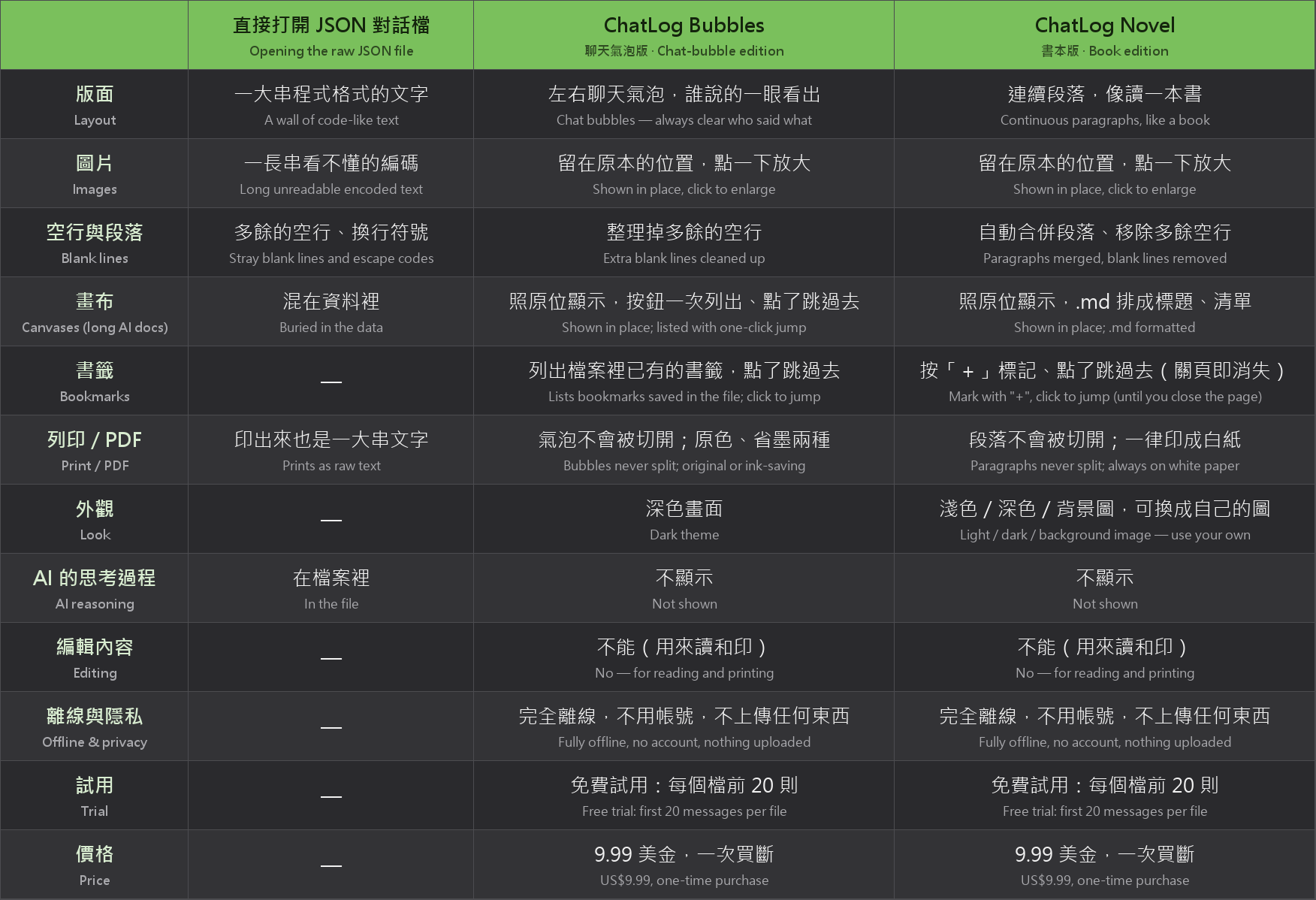
- Chat bubbles, so it is always clear who said what
- Images shown inside the bubbles; click to enlarge
- Canvases (long documents and code written by the AI) shown in place, with a list to jump to each one
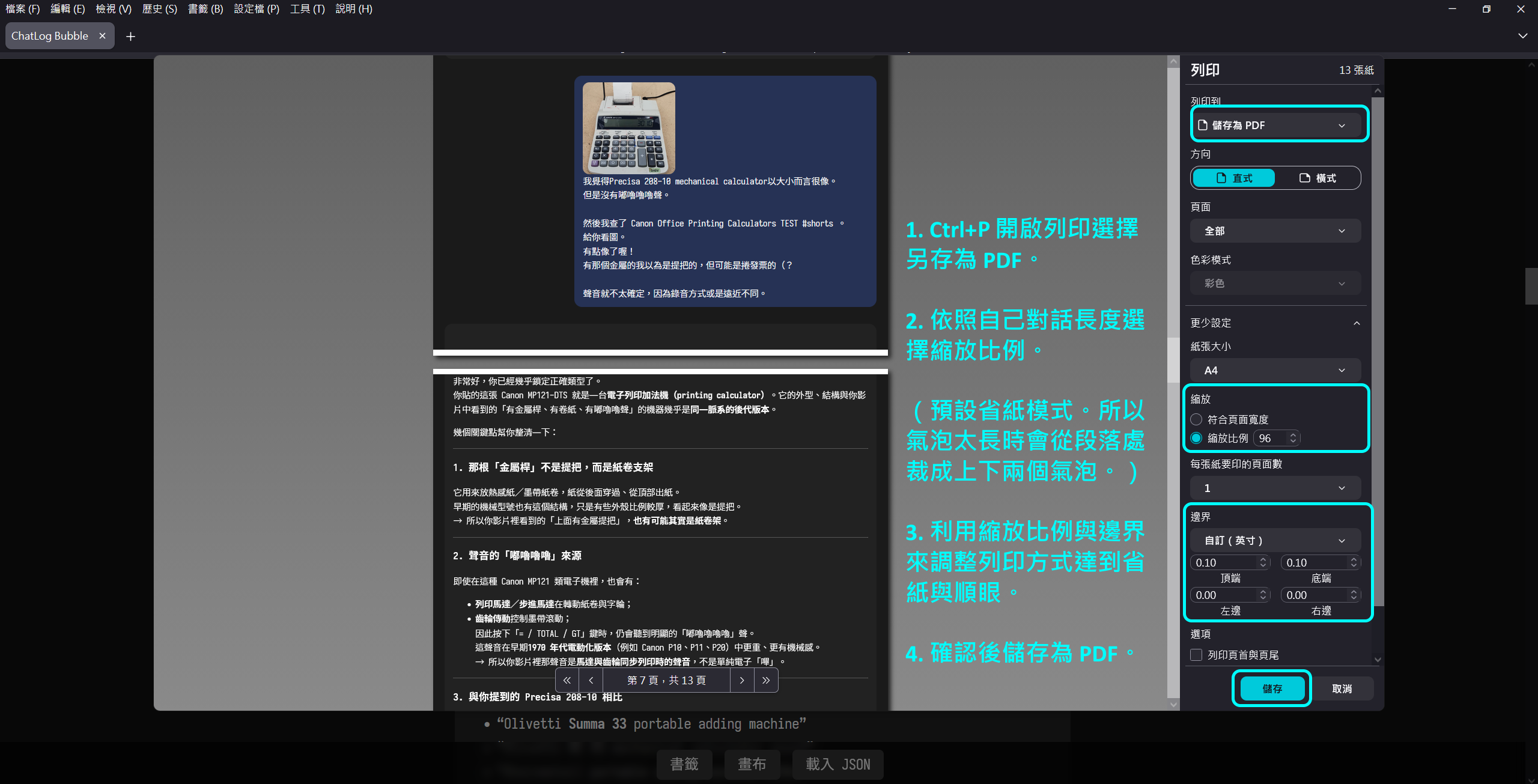
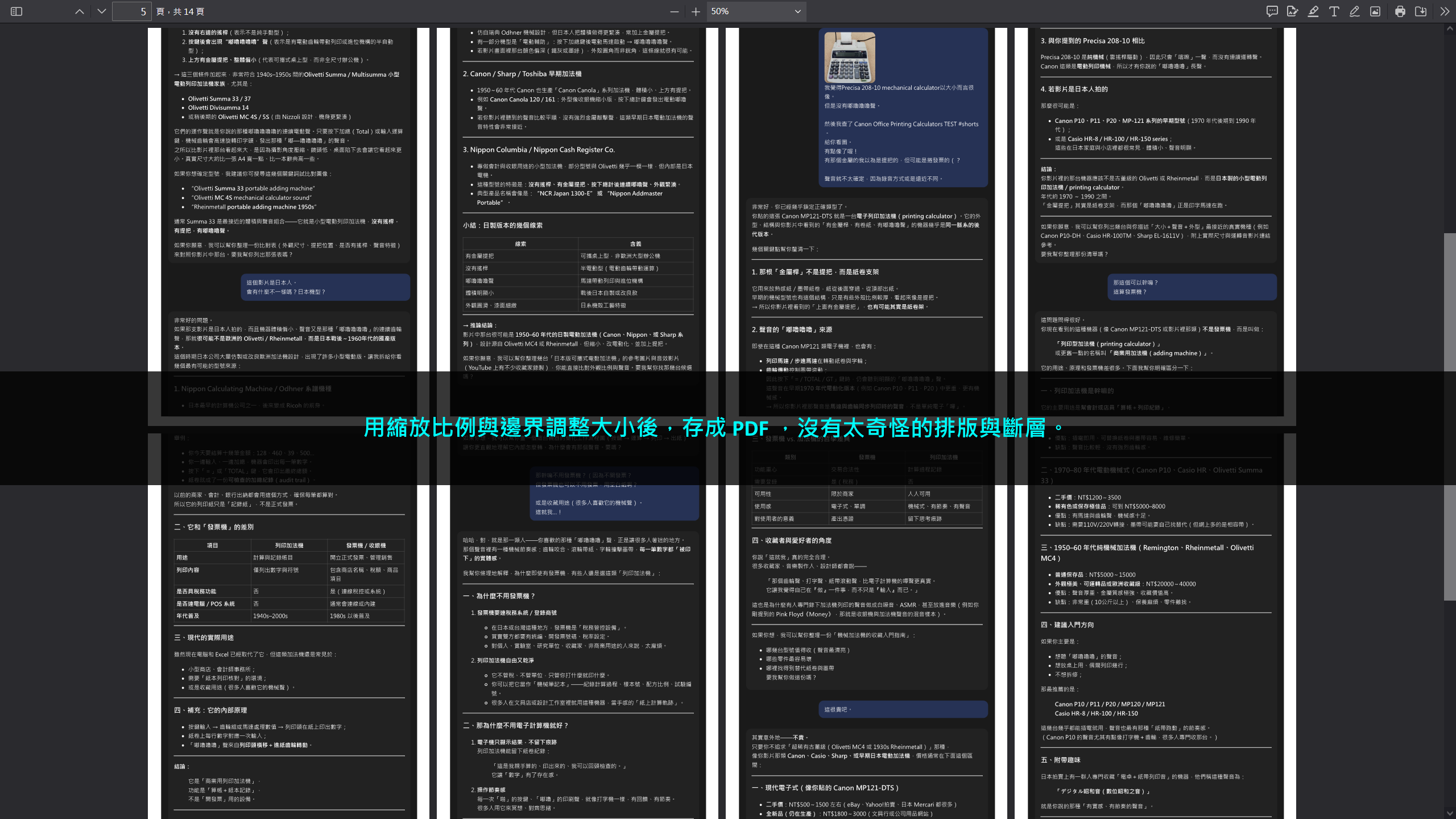
- Printing: short bubbles stay on one page; long ones break between paragraphs, never through a line of text. Buttons are not printed. Choose "Save as PDF" to get a PDF. For printing, Firefox is recommended (Chrome also works); Edge's print preview garbles the layout
- Two print styles: original colours, or ink-saving (white background, black text)
- Find text with your browser's Ctrl+F
Fully offline
No account, nothing is uploaded. Just open the HTML file.
Where the conversation files come from
Save them with the free ChatLog capture extensions:
- Claudelog (Claude): available on the Chrome Web Store → https://chromewebstore.google.com/detail/ejjlnojgdpiagebbgppdfookbfkbbccc
- ChatGPTlog (ChatGPT): available on the Chrome Web Store → https://chromewebstore.google.com/detail/aemimmjoaiohepimeidhmflmoiongglp
What it does not do
- It does not edit conversations — Bubbles is for reading and printing
- It does not show the AI's reasoning (it is saved in the file, but Bubbles shows only the conversation itself)
What you get
- ChatLog Bubbles (two HTML files: original-colour and ink-saving print)
- User guides in English and Traditional Chinese
- A personal license key (claimed on the purchase page after buying)
Coming later
- ChatLog Novel (available now): the same conversation file laid out as continuous pages, like reading a book → https://oowoov.itch.io/chatlog-novel
- ChatLog Editor (in progress): edit messages, add bookmarks and notes, and see the AI's reasoning. Bookmarks made in the Editor are listed by Bubbles' "Bookmarks" button, one click to jump there.
One-time purchase, no subscription. Website changes do not affect it: the conversations you saved stay readable.
The interface is in English and Traditional Chinese — it follows your browser language, and the "EN / 中文" button switches any time.
Bug reports: https://docs.google.com/forms/d/e/1FAIpQLScfCm_LgyIqis7ZNL1nRtN_-Q5Kqf-wyqWzfHJDPRkMSFFIOw/viewform
Update log
2026.10.07: English interface added
━━━━━━━━━━━━━━━━
繁體中文
你和 AI 聊了幾百則。
匯出之後,得到的是一份超級難讀的檔案。
訊息一則一則堆著,滿滿的空行,圖片不見了。
想回頭找某一段只能一直捲。
ChatGPTlog/Claudelog 閱讀器 Bubbles 版。
把那份檔案變回聊天的樣子:你的在右邊,AI 的在左邊,圖片留在它原本出現的位置。就像當初在聊天的時候一樣。
先免費試
下載後不用金鑰就能用:每個對話檔可以看前 20 則。先看看你自己的對話長什麼樣,喜歡再買。
能做的事
- 左右氣泡,誰說的一眼看得出來
- 圖片顯示在氣泡裡,點一下放大
- 畫布(AI 寫的長文件、程式碼)照原本的位置顯示;「畫布」按鈕可以一次列出全部、點了直接跳過去
- 列印:短的氣泡不會被分頁切開;長的氣泡在段落之間換頁,一行字不會被切成兩半。按鈕不會印出來。想要 PDF,列印時選「另存為 PDF」。列印建議用 Firefox(Chrome 也可以),Edge 的列印預覽排版會亂掉
- 兩種列印顏色:原色(跟畫面一樣的深色)、省墨(白底黑字)
- 找字用瀏覽器的 Ctrl+F
完全離線
不用帳號、不上傳任何東西。打開 HTML 就能用。
對話檔從哪裡來
用 ChatLog 的免費擷取擴充存下來:
- Claudelog(Claude):已上架 Chrome 線上應用程式商店 → https://chromewebstore.google.com/detail/ejjlnojgdpiagebbgppdfookbfkbbccc
- ChatGPTlog(ChatGPT):已上架 Chrome 線上應用程式商店 → https://chromewebstore.google.com/detail/aemimmjoaiohepimeidhmflmoiongglp
不做的事
- 不能編輯內容(Bubbles 是用來讀和印的)
- 不顯示 AI 的思考過程(思考過程會存在檔案裡,但 Bubbles 只顯示對話本身)
你拿到什麼
- ChatLog Bubbles(原色列印、省墨列印 兩個 HTML)
- 使用說明(中文、英文各一份)
- 一把個人金鑰(購買後在頁面上領取)
之後會有
- ChatLog Novel(已上架):同一個對話檔,排成整頁段落,像讀一本書 → https://oowoov.itch.io/chatlog-novel
- ChatLog Editor(製作中):可以編輯內容、標書籤和附註、看 AI 的思考過程。在 Editor 標的書籤,Bubbles 的「書籤」按鈕會一次列出,點了直接跳過去。
一次買斷,不用月費。網站怎麼改版都不影響它:你存下來的對話,永遠讀得到。
問題回報:https://docs.google.com/forms/d/e/1FAIpQLScfCm_LgyIqis7ZNL1nRtN_-Q5Kqf-wyqWzfHJDPRkMSFFIOw/viewform
更新紀錄
2026.10.07:加入英文介面
Purchase
In order to download this tool you must purchase it at or above the minimum price of $9.99 USD. You will get access to the following files:
Download demo
Leave a comment
Log in with itch.io to leave a comment.